FUTURE RETRO FUSION
COMMODORE AMIGA - C64 - RETRO COMPUTING
Classic HTML 3.2 Edition
HOME DOWNLOADS GITHUB PROJECTS AMIGA NEWS C64 NEWS LINKS
E-UAE PISTORM TUTORIALS GAME NEWS SHOP ABOUT
SEARCH:
RSS | ATOM | MODERN VIEW

LATEST FROM THE BLOG
Lightweight FlatPress view for classic Amiga browsers. Large images are shown as links.

Tuesday, August 12, 2025
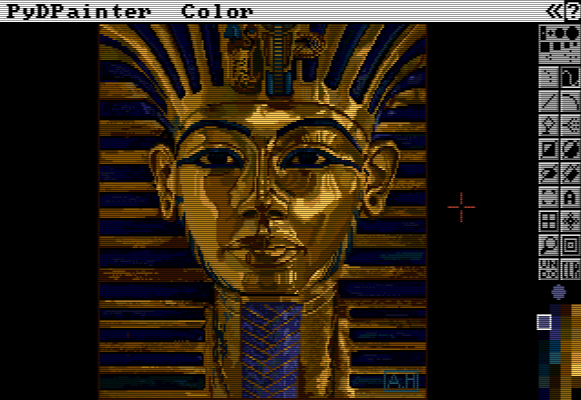
PyDPainter v2.2.0 - Deluxe Paint Nostalgia Meets Modern Pixel Power

? PyDPainter v2.2.0 - Deluxe Paint Nostalgia Meets Modern Pixel Power

? PyDPainter v2.2.0 - Deluxe Paint Nostalgia Meets Modern Pixel Power

If you've ever gotten lost in the groove of Amiga-era pixel art, PyDPainter brings that magic back - rebuilt in Python, powered by PyGame, and polished for modern workflows.

? Cross-platform ? Animation ? Amiga vibes ? 256-step Undo

? What is PyDPainter?

PyDPainter is a modern, PyGame-powered tribute to Deluxe Paint - embracing that left/right-mouse workflow and tight, tactile control that made pixel art feel immediate.

  • ? Familiar L/R mouse drawing & erasing
  • ? Animation support (GIF, IFF ANIM, animbrushes)
  • ? Amiga HAM & palette-friendly tools
  • ? Windows, macOS (Intel & ARM), and Linux builds

? What's New in v2.2.0 (June 14, 2025)

  • ? Brush Trails (ex-"Spacing") - rotate/scale brushes dynamically with smooth ease-in/out.
  • ? Quick Controls - Rotate: 9/0 · Scale: -/= (+) · Or use the ? mouse wheel.
  • ? On-screen Brush Indicator - Live brush type, rotation, and size.
  • ? Native File Dialogs - Use your OS picker.
  • ? Signed Windows EXE - Fewer antivirus false positives.
  • ? macOS polish - Native ARM .app + proper ? shortcuts.
  • ? Clipboard -> Text Tool - Paste text directly.
  • ? Click/Click Menu Mode - Friendlier on laptops.
  • ? Undo Boost - from 20 to 256 levels.
  • ? Docs updates - Brush Trails guide, Screen formats.

? Milestones So Far

? Roadmap & What's Next

Peek at the evolving plan here: RoadMap.

  • ? Stencils & masks
  • ? Background layers
  • ? Advanced animbrush tools
  • ? Perspective guides
  • ? Improved font handling

? Why Pixel Artists Love It

PyDPainter balances retro charm with modern power - ideal for sprites, retro illustrations, and hypnotic color-cycle animations. With a forgiving 256-step undo and a workflow that "just feels right," it's a welcoming space for both newcomers and Amiga veterans.

Pro-tip: map your favorite keys, try Brush Trails, and experiment with animbrushes. Happy painting! ????

Posted by (c) FRF1984 -2025 - 07:01:24
in General
3521 views
Add a comment

Thursday, August 7, 2025
REDPILL GAME MAKER TRIGGERS

Condition Triggers - Examples & Use Cases
ALWAYS
Use case: Apply gravity to your player every frame to simulate consistent falling behavior.

ONCE
Use case: Set an initial position or give a power-up only when the object is created.

NEVER
Use case: Temporarily disable a trigger by using it as a placeholder.

LEVEL IS
Use case: Trigger special dialogue in levels >= 5, e.g., display a boss warning.

ON LEVEL LOAD
Use case: Reset object health or initialize environmental settings each time a level starts.

COUNTDOWN
Use case: Self-destruct a bomb or spawn an enemy after a delay (e.g., after 5000 ms).

INPUT LEFT / RIGHT / UP / DOWN / FIRE 1 / FIRE 2 (with statuses like Pressed, Released)
Use case: Jump when "Input Up Pressed Player 1" is triggered, or shoot when "Fire 1 Pressed".

CD32 button inputs (Play, Reverse, etc.)
Use case: Use CD32-specific controls for menu navigation in CD32 versions.

VAR TRIGGERED / VAR TRUE / VAR FALSE / VAR IS
Use case: Check if "Lives > 0" before allowing a continue; or trigger something once a var becomes true.

GO CUSTOM 1 / 2
Use case: Use object-local variables to track an internal state, like if an enemy is “alerted”.

GO TIMER TRIG
Use case: After a countdown timer, make an enemy recharge or change behavior.

TIMER ACTIVE / NOT ACTIVE
Use case: Prevent re-triggering a power-up while its timer is still active.

COLLIDES PLAYER / COLLIDES OBJECT / COLLIDES TYPE
Use case: When an enemy collides with the player, reduce health or bounce the player back.

TARGET POS X / Y
Use case: Make an enemy follow the player when the player’s X position is less than the enemy’s ("Target Pos X < My Player").

DIST TO TARGET
Use case: When player gets within a certain radius, enemy switches to "chase" mode.

Action Triggers - Examples & Use Cases
NOTHING
Use case: Temporarily deactivate an action trigger without deleting it (easy toggling).

MOVE TO LEVEL
Use case: Teleport the player to a hidden level when they reach a trigger area (like a secret door).

NEXT LEVEL
Use case: Advance the game when the player reaches the end of the stage.

RELOAD LEVEL
Use case: After player death, restart the level to the initial state.

RESTART LEVEL
Use case: Respawn player at the start, but maintain changes like collected items.

HUD ON / HUD OFF
Use case: Turn off HUD during cutscenes and restore it afterward.

HUD LABEL ON / OFF
Use case: Toggle icons like "Key Collected" or "Warning" on the HUD.

QUIT
Use case: End the game and return to the Workbench - e.g., when player selects “Quit” in menu.

SHOW TEXT
Use case: Pause the game and show tutorial text or narrative messages.

SHOW DIALOG
Use case: Display dialogue with a title (e.g. “Boss Incoming”) and message, pausing gameplay.
Posted by (c) FRF1984 -2025 - 22:37:06
in General, Tutorials
1848 views
Add a comment

Wednesday, July 30, 2025
Flamingo Emulator (Plus/4 for Amiga)

Flamingo Emulator (Plus/4 for Amiga)

Flamingo Emulator

Commodore Plus/? emulator for Amiga (68k & PowerPC)

Overview

Flamingo is a Commodore Plus/4 emulator designed to run on Amiga systems (both Motorola 680x0 and PowerPC-based systems). Version 1.54 is the final release for AmigaOS?3.x and WarpUp environments; later versions were intended for AmigaOS?4.0 (PowerPC) :contentReference[oaicite:1]{index=1}.

Requirements

  • Amiga Kickstart ROM version 3.0
  • Joined BASIC + KERNAL ROM image (must create using “JOIN” command) :contentReference[oaicite:2]{index=2}
  • Processor: 68020+ recommended; PowerPC with WarpUp V4 for PPC version
  • Graphics: ECS, AGA, or CyberGfx (native chunky mode for CGFX or PPC for Chunky2Planar)
  • Memory: ~1.5?MB free RAM (depends on video driver); fast RAM recommended
  • Supporting libraries: asl.library, gadtools.library, iffparse.library (for snapshot support), 6581sid.library (SID emulation), and cybergraphics.library v4.0 for video modes :contentReference[oaicite:3]{index=3}

Features & Compatibility

  • Full-speed playback of Plus/4 games and software on Amiga hardware
  • Snapshot facility to save emulator state (requires iffparse.library)
  • SID audio emulation via 6581sid.library
  • Multiple video drivers: ECS, AGA, CGX, including a CGX-DeltaRefresh driver optimized for slower graphics cards :contentReference[oaicite:4]{index=4}
  • Joystick support fixed and improved over earlier versions :contentReference[oaicite:5]{index=5}

Usage Notes

  • Obtain BASIC and KERNAL ROMs separately; use Amiga “JOIN” tool to merge them.
  • Ensure all required external libraries are installed.
  • Choose appropriate video driver based on your Amiga’s hardware.
  • For better performance on PPC-based systems, install WarpUp V4 (for PPC and CGX chunky2planar support).

Download

https://futureretrof … attachs/Flamingo.lha
https://futureretrofusion.com/fp-content/attachs/Flamingo.lha

Posted by (c) FRF1984 -2025 - 20:40:41
1800 views
Add a comment

NEW: AMIGA GAMING ROUNDUP
May - August 16, 2026
Releases, ports, demos, events and projects.

[ READ THE ROUNDUP ]

SOFTWARE HUB
FRF Downloads
GitHub Projects
E-UAE
PiStorm
Projects
Tutorials

SITE DIRECTORY
Latest Posts
Amiga / C64 Links
More Retro Links
Amiga News Sites
C64 News Sites
Shop

CATEGORIES

ARCHIVES

QUICK LINKS
Aminet
English Amiga Board
Hall of Light
WHDLoad
Lemon Amiga

Future Retro Fusion - Commodore Amiga Website
futureretrofusion.com | Modern browser edition
This classic edition uses no CSS and no JavaScript. Images are links so pages stay light.